What are lead-to-client systems?
A practical explanation of how enquiry capture, CRM, follow-up, quoting, reporting and handover connect.
Read article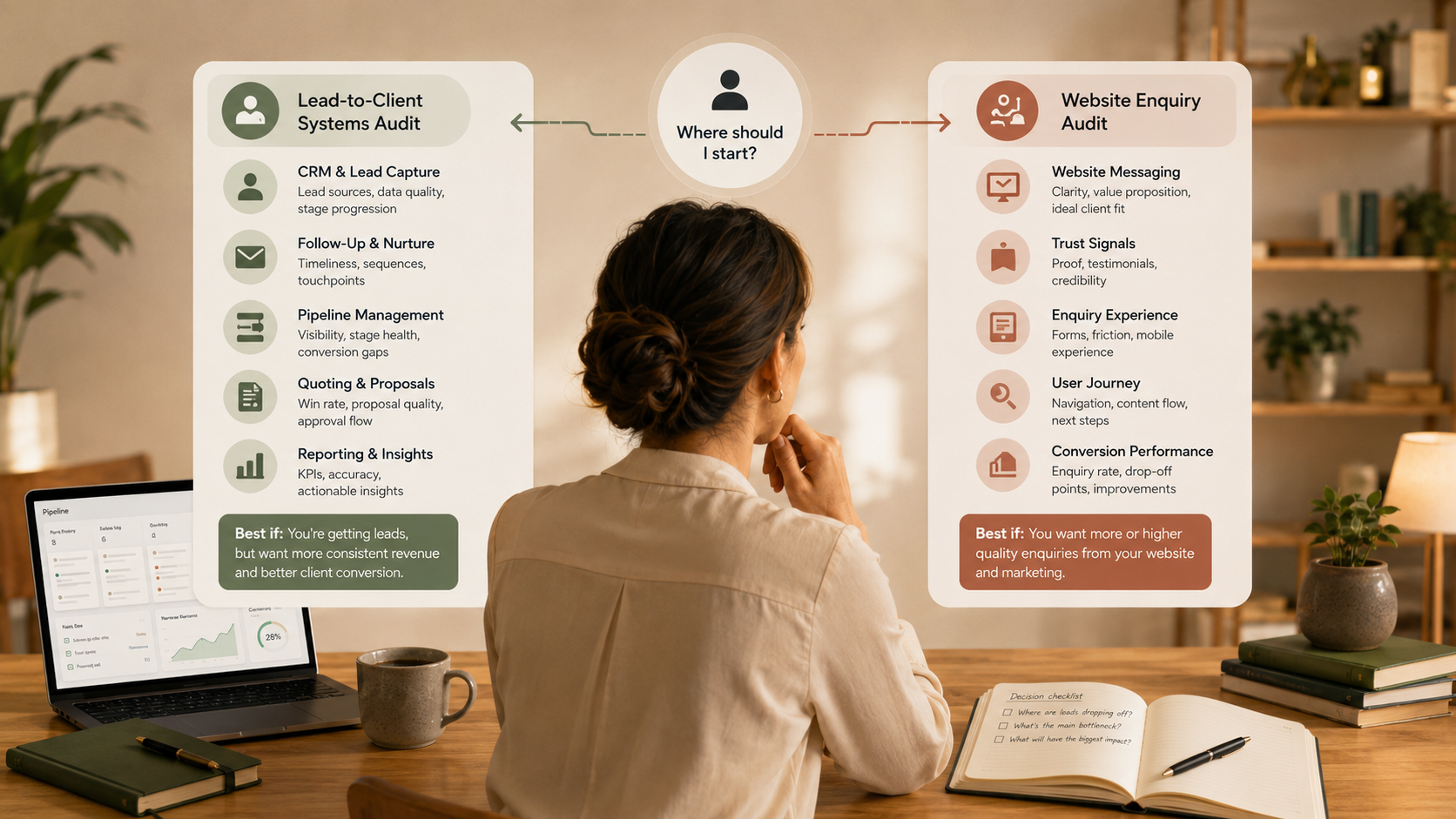
If you are choosing your first OpsClarity service, the simplest question is this: does the friction happen before the enquiry, or after the enquiry?
If people are visiting your website but not understanding, trusting or enquiring, start with the Website Visibility Audit. If enquiries are arriving but the follow-up, CRM, pipeline, quoting, reporting or handover feels messy, start with the Lead-to-Client Systems Audit.
OpsClarity is intentionally structured around two first-step Audits. This keeps the work focused and avoids jumping straight into Support before there is a clear understanding of the current setup.
This path is for businesses where enquiries are already coming in, but the internal process is harder than it should be. You may be dealing with unclear ownership, inconsistent CRM records, manual follow-up, messy pipeline stages, quote tracking gaps or handover issues.
The Audit identifies what is happening across the lead-to-client journey. If implementation support is needed, the Lead-to-Client System Build can then help improve the practical setup.
This path is for businesses where the website is part of the issue. You may be getting traffic but not enough enquiries, receiving low-quality enquiries, or feeling unsure whether the service pages explain the offer clearly.
The Audit reviews the path from visit to enquiry. If the foundations need improvement, the Website Visibility Build can help strengthen page structure, metadata, internal links and enquiry pathways.
This Audit is about the operational path after interest is captured. It is especially useful if your business has enough lead activity to create friction, but not enough clarity to manage that activity confidently.
This Audit is about the pre-enquiry journey. It looks at whether the website helps the right person move from interest to action.
Useful decision-making often comes from combining website and CRM signals. Website analytics can show how people engage with pages, while CRM data can show whether those enquiries turn into quality opportunities.
Google Analytics engagement metrics can help you understand whether visitors are interacting with the site. Google defines engaged sessions using signals such as duration, key events or multiple views. Google's engagement rate guidance is a useful reference for interpreting this.
Inside the CRM, pipeline structure helps you understand where opportunities sit and where they stall. HubSpot's guidance on pipelines is a helpful reference if you are deciding whether your pipeline stages reflect a real process. HubSpot pipeline guidance
Many businesses have both website and sales system friction. In that case, start where the friction is costing you the most clarity right now.
If you already receive enough enquiries but struggle to manage them, start with lead-to-client systems. There is little benefit in generating more leads if the business cannot confidently capture, follow up and convert the ones already arriving.
If enquiry volume or quality is the main concern, start with website visibility. There is little benefit in refining pipeline stages if the website is not clearly helping the right people enquire.
Lead-to-Client Systems Support is designed for businesses that already have a baseline understanding of their setup and want ongoing improvement. It is not intended as the first service for a new client because Support works best after the foundational Audit and, where relevant, Build work has clarified the systems.
This protects both sides. You get more useful Support, and OpsClarity can improve your systems with enough context to make practical recommendations.
If this sounds familiar - Start here:
“We get enquiries, but managing them is messy.”Lead-to-Client Systems Audit
“People visit the website, but they do not enquire.”Website Visibility Audit
“The CRM is not trusted or consistently used.”Lead-to-Client Systems Audit
“Our service pages feel unclear or thin.”Website Visibility Audit
“I am still unsure.”Complete the Clarity Check
The quickest way to choose is to complete the Clarity Check. It is designed to recommend either the Lead-to-Client Systems Audit or the Website Visibility Audit as your most useful starting point.