What are lead-to-client systems?
A practical explanation of how enquiry capture, CRM, follow-up, quoting, reporting and handover connect.
Read article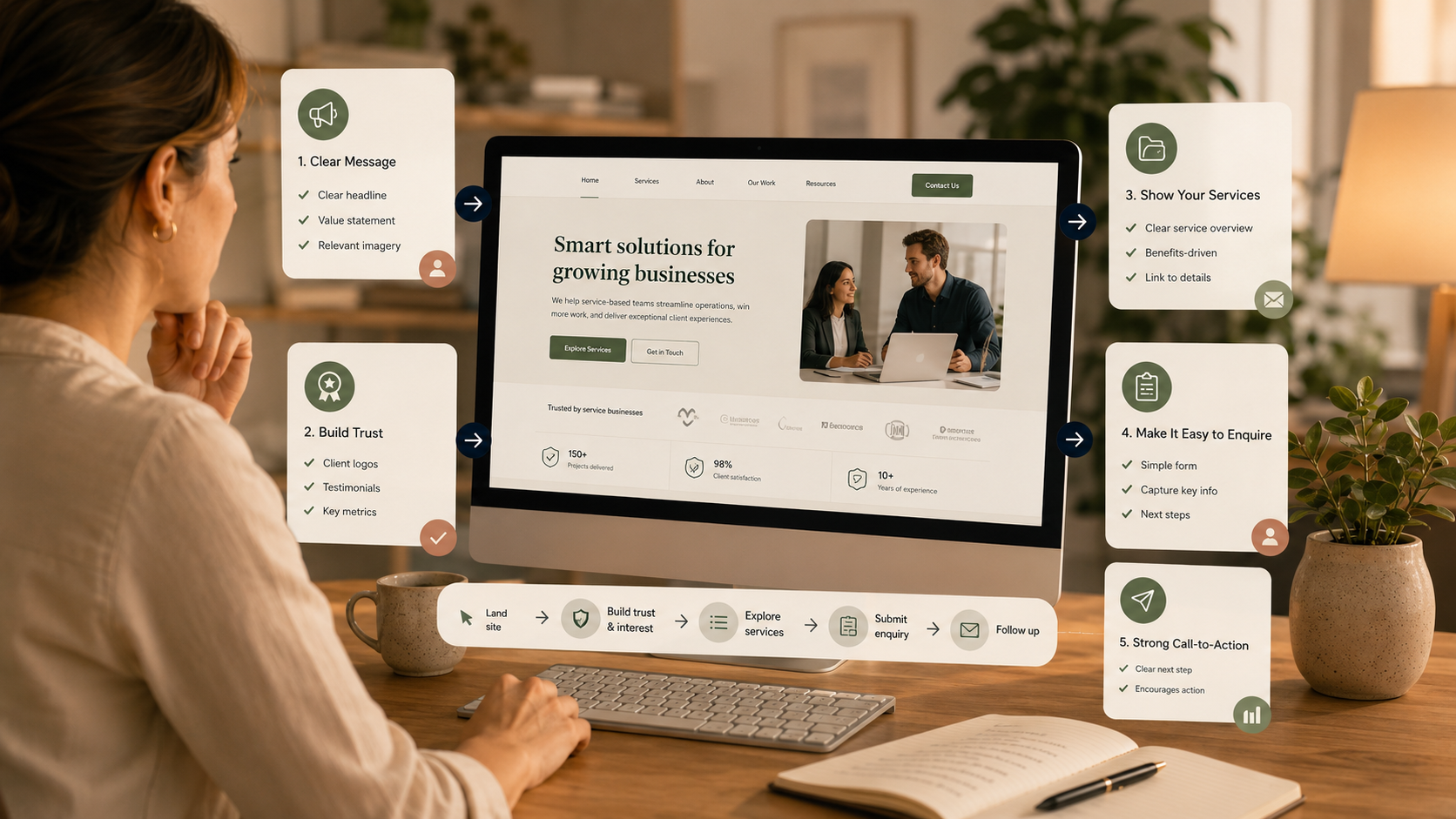
Website enquiry flow is the path a visitor follows from arriving on your website to understanding what you offer, trusting your business and submitting an enquiry.
For service businesses, this flow matters because the website is often where interest either becomes action or quietly disappears. The visitor may have found you through search, a referral, LinkedIn, an email signature or a direct recommendation. Once they arrive, the site needs to help them answer: “Is this for me, do I trust this business, and what should I do next?”
It is tempting to assume that more traffic will solve enquiry problems. Sometimes it will. But if visitors are landing on the site and not understanding, trusting or enquiring, the first priority is the flow itself.
Google's SEO guidance explains that SEO is about helping search engines understand your content and helping users decide whether to visit your site. That same principle applies after the click: the page should help real people understand what you do and whether it is relevant to them. Google's SEO Starter Guide is a useful source for the fundamentals.
Every important page should have a clear job. A service page should explain the service, who it is for, what problem it solves, what the process looks like and what the next step is. An industry page should show relevance to that industry. A resources page should help people learn and continue into the most useful next action.
If a page is trying to say everything to everyone, it often becomes less persuasive.
Visitors should quickly see language that matches the reason they came to the page. If someone searches for help with CRM setup, they should not have to decode abstract operational language before they know they are in the right place.
For OpsClarity, this is why plain-English phrasing matters. Terms like RevOps and GTM can still sit behind the strategy, but the front-end messaging should speak to what business owners recognise: enquiries, follow-up, CRM, quotes, reporting, handover and messy systems.
Trust does not come from one testimonial alone. It is built through the full page experience. Useful trust signals include:
A CTA should match the visitor's readiness. Someone who is ready to talk needs an easy path to book a call. Someone who is unsure may need a Clarity Check, service comparison or article first.
On a service business website, the main CTA should be visible and repeated at sensible points, but not so often that the page feels pushy. The wording should also be clear. “Book a Clarity Call” is stronger than a vague “Submit” or “Learn more” when the next step is a conversation.
Your enquiry form should collect enough context to support a useful response, without creating unnecessary friction. Ask for the information you genuinely need at this stage.
In Australia, privacy and data collection should also be considered. The OAIC's guidance on collecting solicited personal information explains principles around collecting information that is reasonably necessary for an organisation's functions. OAIC APP 3 guidance is a useful reference for thinking carefully about website forms.
The enquiry flow does not end when the form is submitted. A good confirmation page should set expectations and guide the visitor to a useful next step. Behind the scenes, the form should create or update CRM records, capture source information where possible and trigger a clear follow-up process.
Analytics should help you understand behaviour, not just traffic. Google Analytics defines engaged sessions using signals such as sessions lasting longer than 10 seconds, having a key event, or including two or more page or screen views. Google's engagement rate guidance can help you interpret these metrics in GA4.
Useful website enquiry flow signals include:
A page that is difficult to read, navigate or use will reduce trust. W3C's WCAG 2.2 guidance covers a wide range of accessibility recommendations and notes that accessibility improvements often make web content more usable in general. WCAG 2.2 is a helpful reference for web accessibility expectations.
The Website Visibility Audit reviews the path from website visit to enquiry, including page clarity, CTAs, form flow, trust signals and connection to your lead-to-client process. If the Audit shows the website and search foundations need practical implementation, the Website Visibility Build can help strengthen metadata, headings, internal links and enquiry pathways.